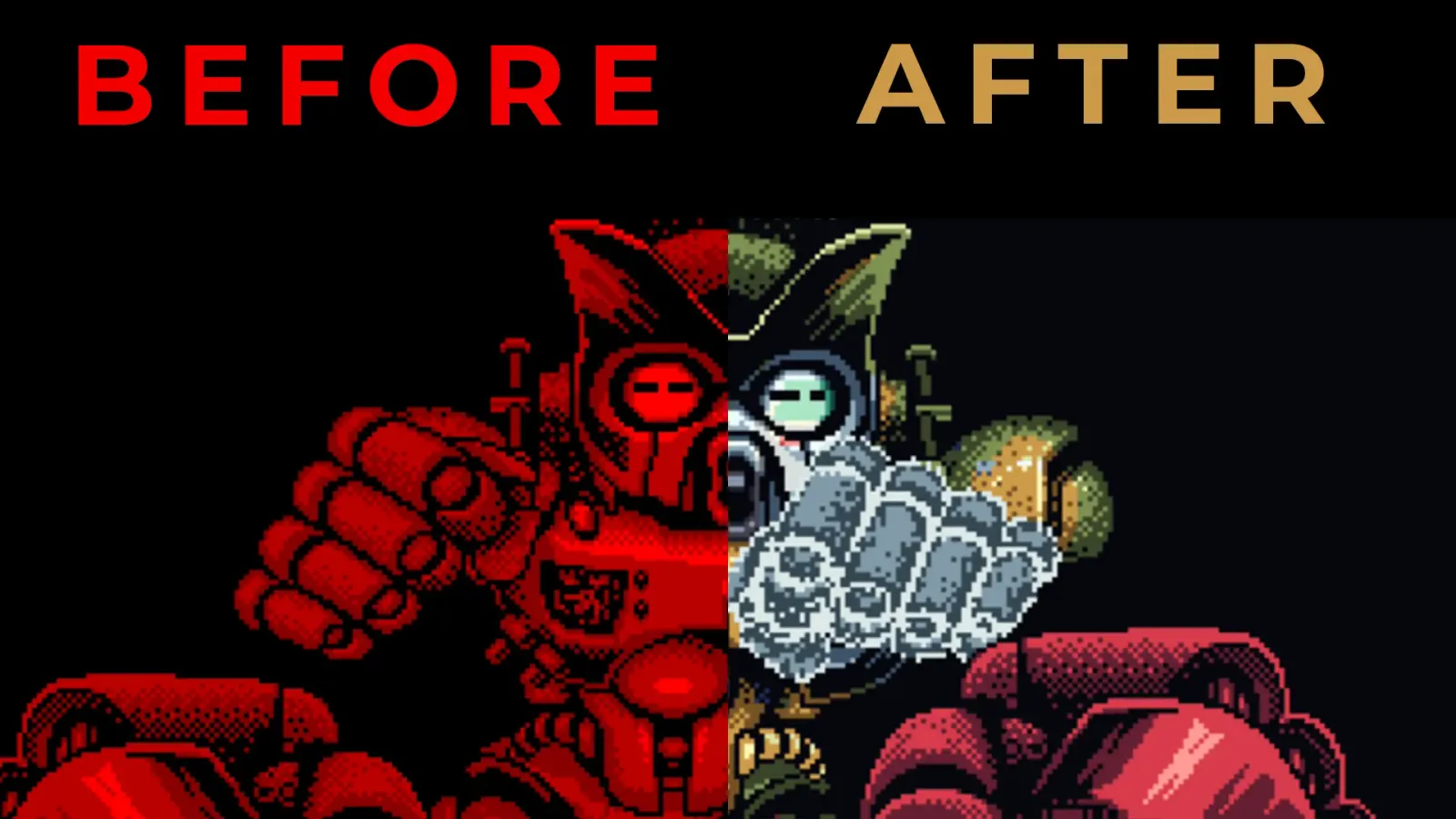
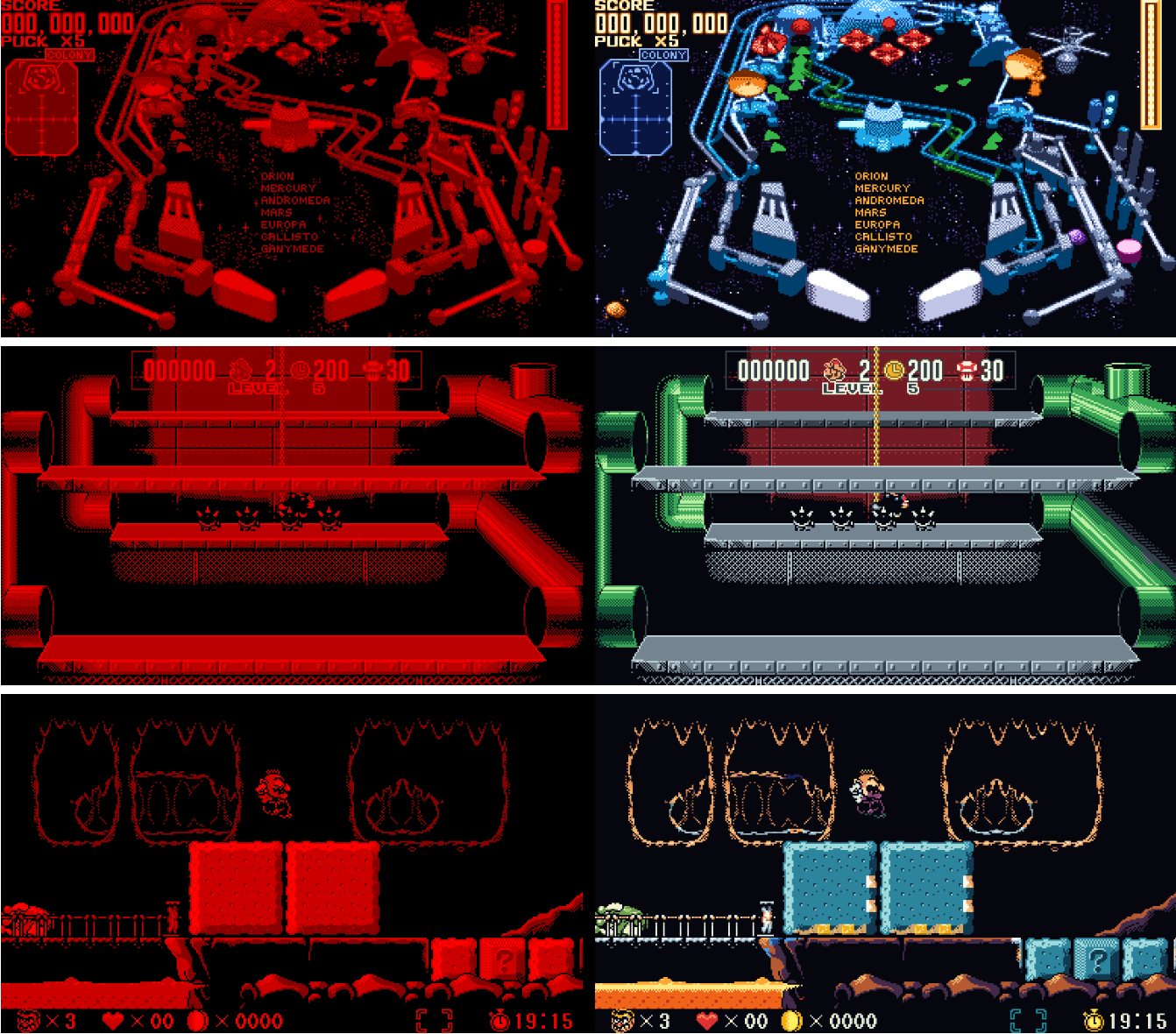
A new emulator for PC and Meta Quest has launched specifically for the Virtual Boy, allowing retro gamers to turn the overpowering red graphics into full colour thanks to the array of built-in colour packs, and it does all of this magic automatically.
This new emulator is called VBoy Color, created by yuk27. It keeps the real stereoscopic 3D graphics but enhances them in a way that offers a whole new colourful look to the games, changing them from the somewhat painful, but intriguing bright red to something a little bit more modern, offering a new way to play these games like never before.
So what does this emulator do exactly?
- Color, four ways (Settings → Color mode):
- Auto (default) - every pixel is colored by what drew it: background layers by their depth (far to near: dusk violet, brick, amber, sand), characters by their palette, each with dark/light/lightest steps. What a game draws without tiles (Red Alarm's wireframe world, 3-D Tetris's well) is colored by how far away it is - the distance between the two eyes' pictures - from indigo far away to gold up close. Every game shows many colors with no setup.
- Multicolor - each of the Virtual Boy's four shades gets its own color (in the spirit of Red Viper's multicolour mode), from a set of palettes.
- Gradient - the game's brightness mapped onto a color gradient (Jade, Ocean, Sunset, Ember, Frost, Toxic).
- Tint - the classic look: red, or any color you mix.
- Color packs - hand-painted colors for a game, tile by tile, shown in Auto and Multicolor modes. Packs for Bound High, Galactic Pinball, Innsmouth no Yakata, Jack Bros., Mario Clash, Mario's Tennis, Panic Bomber, Space Invaders Virtual Collection, Teleroboxer, Vertical Force, V-Tetris and Wario Land are built in, plus the menus and HUD of Red Alarm and 3-D Tetris (their 3-D worlds are drawn without tiles, so Auto colors them by depth), Virtual Bowling's HUD, gauges and menus over its Sunset lanes, and Golf's menus and hole maps (its rounds are drawn without tiles too). Packs hold only colors, no game graphics. A
.vbcpfile next to a ROM overrides the built-in one, and you can paint your own on PC: see docs/COLOR_PACKS.md. - Colors per game - every Virtual Boy game starts in the scheme that suits it best (picked game by game: Red Alarm's wireframes by depth, Golf's fairways green, Virtual Bowling's lanes in Sunset wood...), and remembers yours once you change it.
- A library of your games - each one a card with its box art, downloaded from libretro's thumbnail collection (keep playing while it comes). A game without box art, or with no internet, gets its title screen in its own colors instead, made on your device (nothing of any game ships with the app); Settings → Download box art off shows title screens for all. As a list (Y) or last played first (X), and all games or only those with a color pack (the chip at the top, or Settings → Only games with color packs). Pick with the sticks, a gamepad, the mouse, or by pointing a Quest controller and pulling its trigger.
- Real 3D on Quest - each eye gets its own picture, as on the hardware, and both eyes always show the same colors.
- Save states - several slots per game, with thumbnails in color.
- Button mapping - Quest controllers, gamepads and keyboard, all remappable.
- Screen looks - Settings → Screen → Look: Sharp pixels, Smooth (OmniScale's rounded edges and diagonals) or LED (the Virtual Boy's own rows of light, with a soft glow). Both eyes always get the same look, so the 3D stays clean.
- Screen placement - size and distance of the screen in VR; on PC, Settings → Screen → Size: as big as the window allows (Fit) or Whole pixels.
- 3D on a normal screen (PC) - Settings → Screen → 3D: side by side for 3D TVs and monitors (squeezed, as their Side-by-Side mode expects), side by side (full) or cross-eyed for viewing without a TV's help, top and bottom, or one picture for colored glasses - red / cyan, green / magenta or amber / blue (mixed with Dubois' method, which keeps the games' colors as true as the glasses allow).
- Your room as the background (Quest) - Settings → Adjust screen → Show your room around it: the game floats in your room (passthrough) instead of in the dark.
- Your own folders - Settings → Folders: choose where your games, saved games, save states and settings go (a synced folder, say). On PC you pick them right in the menu, with the mouse, a gamepad or in VR; on Android with the system's folder picker (on the Quest, when the app next starts). The files already there are copied over - newer ones win, the one replaced is kept as
.bak, and the originals stay where they were. - Video recording (PC) - F12 records the original red and the colored version side by side, frame for frame, for comparison videos (F12 again to stop; it stops on its own after ten minutes).
- Tool-assisted runs (PC) - drop a Virtual Boy run from TASVideos (a
.bk2file) on the window, or open it withVBoyColor.exe: its game (from yourromsfolder) plays the whole run by itself, in color - press F12 to record it. Your own save stays untouched; when the run ends, you take over.
The developer has openly stated that this emulator was built using Claude: " I painted a bunch of characters manually, and asked Claude to extrapolate from those to the rest of each game", so do expect some inconsistencies and possible bugs when exploring this emulator. We respect his transparency here and hope it doesn't use any form of GenAI or take from copyrighted IP.
It's now available to download for PC and MetaQuest via GitHub, just please do your own due diligence when downloading unknown files from GitHub. Hopefully this helps you explore these retro games in a new way!