I recently sat outside my local climbing gym with a friend in an attempt to trade a spare Mew he had on his Pokémom Blue cart so that I could have one on my Pokémon Red (shoutout Cris). We had a god-awful link cable connecting our Chromatics that just wouldn't work. Ok, we could have used a better link cable, but now that Shiny Relay can connect up Chromatics via WiFi, I could have that Mew in an instant and still get a couple of hours climbing in before closing time!
Shiny Relay is a new add-on for the Chromatic that carries the Game Boy Link Cable functionality over WiFi. It can also put games and apps onto the Tetris Cartridge that comes with the Chromatic without the need to use a Flash Cart.
There have been a couple of programs like this coming to the fold recently. The Chromatic has been open-source since release, but it's only now that people have really started working on projects like Shiny Relay. Gone is the need for a link cable. All you need is Shiny Relay installed on your Chromatic, and a free Shiny Gen account if you want to play over WiFi.
The @modretro Chromatic now has local and online wireless connectivity with shinyrelay . com 🛜 - local and online wireless multiplayer - install roms to your modretro tetris cart over usb - free games and internet apps: weather, maps, & more - modify these free games and install to your tetris cart Online, free, no app install. On shinyrelay . com more info in the thread 🧵
— David Walter (Shiny Gen) (@davidpwalter) October 12, 2026
Shiny Relay is a custom firmware install that you need to install from your browser, and it runs on the handheld's FPGA and ESP32 WiFi chip. If you want to put the firmware that came on the Chromatic back onto the console, you can do it with the free updater that can be downloaded from the ModRetro website. The Chromatic has WiFi built in (we discovered this when we took ours apart on our initial review, and Shiny Relay uses that chip to carry the link cable. You essentially create your own network between Chromatics, and the game thinks a cable is plugged in.
Shiny Relay has been tested on real hardware with zero problems in trading Pokémon or playing Multiplayer games, meaning it's ready to go, including putting games onto the Tetris Cartridge and Tetris back on again using a game backup.
Putting Shiny Relay games onto the Tetris Cartridge is pretty cool, especially for those who don't have a flash cart. The games all have shades of other famous games like 'Shiny Monsters Color' and 'Shiny Kart Color', and you can put your own ROMs on there too. Again, you can back up Tetris first so that you can put the game back on the cartridge at any time, and it takes around 2 to 8 minutes to put new games onto the cartridge.
Here's how to get a new game onto the Tetris cartridge:
- Choose. Pick what goes on the cartridge: a free Shiny Gen game or app, the PARTY BATTLE patch for Tetris, or the + cartridge for your own game file (.gbc or .gb).
- Connect. Click Connect and pick Chromatic - Player 01. Click Connect once more and pick GWU2X. Chrome asks twice because the Chromatic shows up as two devices, and it asks for GWU2X again on each visit.
- Prepare. Click Prepare my Chromatic. It takes about 1 to 2 minutes and the Chromatic restarts twice. This loads temporary cartridge access. Nothing is installed.
- Back up. Click Back up my cartridge, then save the game file and the save file. Keep the 2 files together: they are your way back to Tetris. You can skip the backup, but then the game on the cartridge now cannot be put back from this page.
- Install. Click Install, type INSTALL and click Start. Keep the cable in and the Chromatic on until it says done.
- Turn your Chromatic off and on. When the page says Done, slide the power switch OFF, wait 2 seconds, then ON.
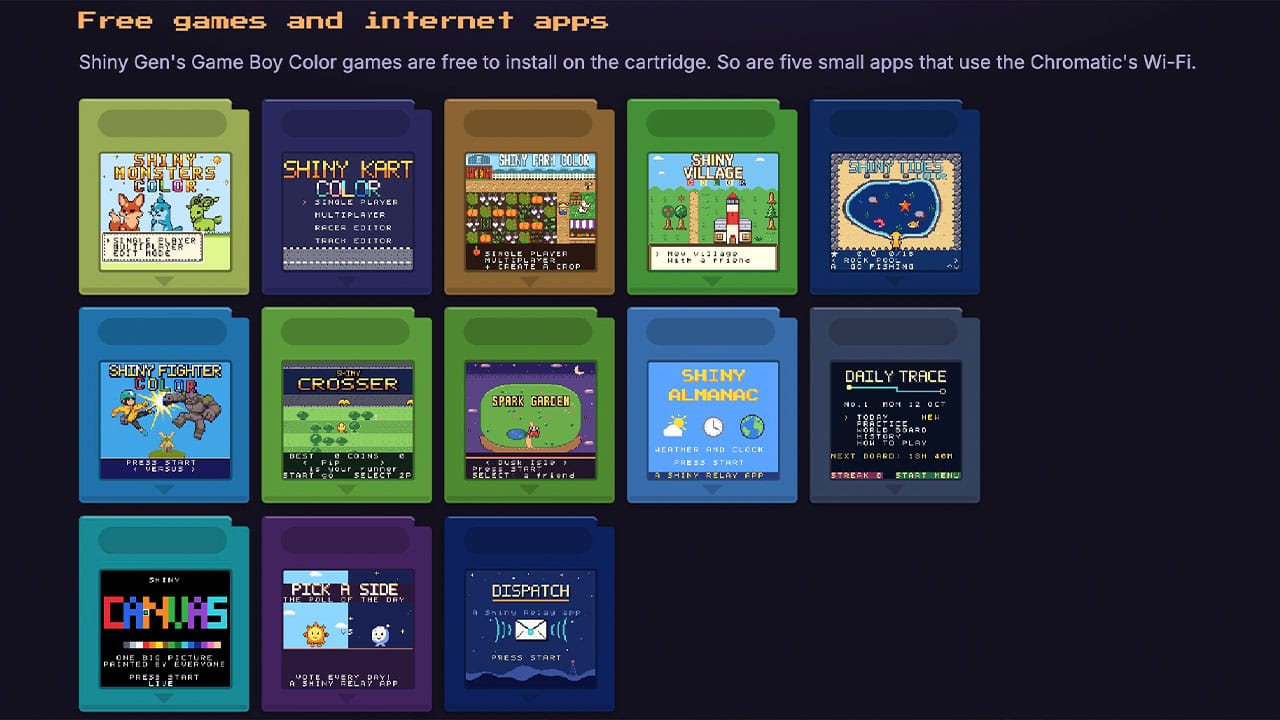
The current games include:
- Shiny Monsters Color
- Shiny Kart Color
- Shiny Farm Color
- Shiny Village
- Shiny Rides
- Shiny Fighter Color
- Shiny Crosser
- Spark Garden
There are also some internet apps that you can add to the Chromatic too:
- Shiny Almanac - Weather, Clock, Calendar, and World Map
- Daily Trace - A daily worldwide puzzle
- Shiny Canvas - A shared canvas that everyone around the world paints on
- Pick A Side - A poll of the day
- Dispatch - Posts from ModRetro
Head to Shiny Relay to install and get started!