


I love Game of Tobi's work, and I especially love it when I come back from holiday and find that he's dropped a new video showing his work bringing Super Mario Galaxy to the GBA. He's a Mario backporting wizard, and I've covered all of his work to bring Super Mario 64 to the GBA and other exciting projects over the last year. Now, he's been working on getting Super Mario Galaxy onto the GBA with another highly polished announcement video.
So how has all of this come about? Well, as you know if you're a regular reader, Tobias Friedly loves playing with Super Mario source code. Writing on this latest project, he says that 'every model, animation, texture, sound, piece of music and line of text is constructed on your computer from your own copy of SMG while the game is built'. You'll need your own legally acquired ROM of Super Mario Galaxy to get this working, and Tobias has sorted out the rest for you.
What I like about Tobias' work is that he's incredibly transparent. All of the source code of the engine and the game's code is available for you to peruse - he's got no secrets to hide. He's relied on the engine made by Joshua Barettos and the recent decomp of SMG to get the ball rolling, and while a lot blockier than the original Wii game, it's still a fully playable version of Super Mario Galaxy on a handheld that came out way before the Wii. And let's face it, they were never going to compare - the Wii is WAY more powerful, but this is such a fun and ambitious project and delivered in Tobi's trademark way, and it's very impressive.
Tobias' videos just make me smile; he loves what he does so much, and that comes out in the creativity and sheer awesomeness of his videos. They're like movie trailers, all accompanied by his trusty tribal GBA SP.
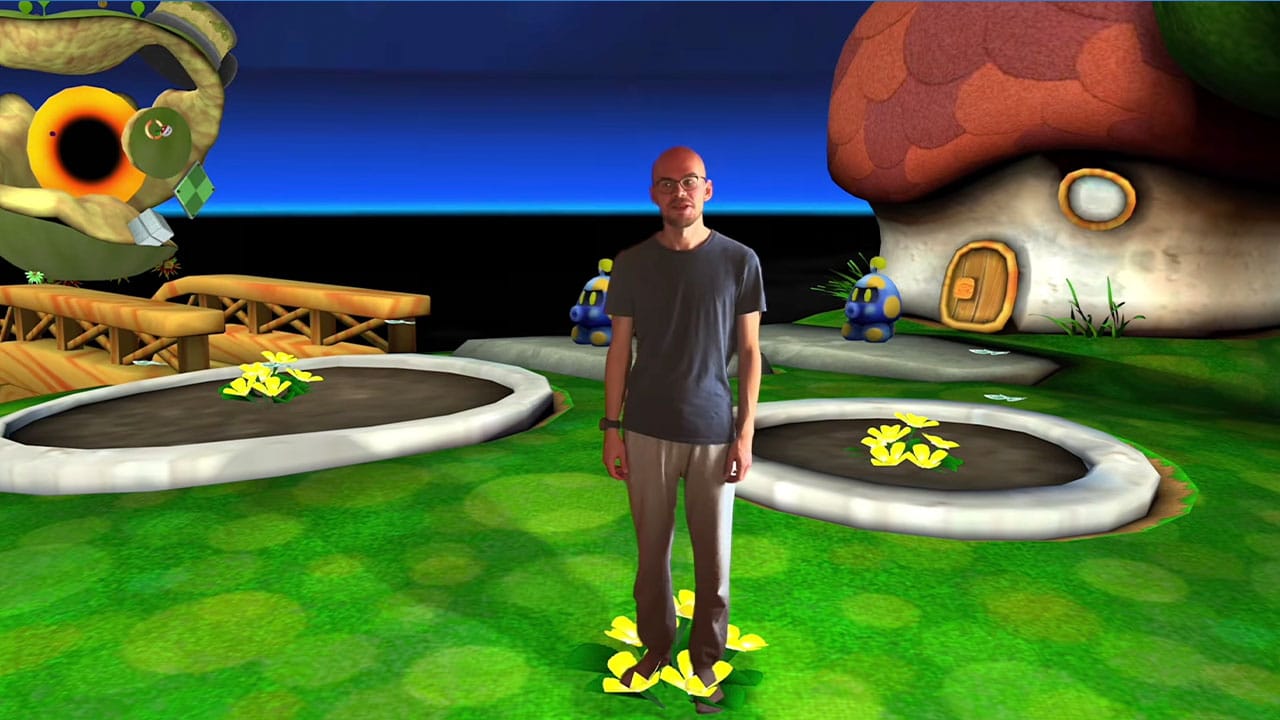
You'll need a legally acquired version of SMG (USA) as an .iso file. Once you've obtained that 100% legally acquired ROM, you can follow the instructions from Tobi's Github below to get started:
macOS
- Open Terminal
Install Apple's developer tools:
xcode-select --install
Click Install on the opened window
- Install devkitPro:
- Download
devkitpro-pacman-installer.pkgfrom https://github.com/devkitPro/pacman/releases/latest and open it. If macOS blocks it, go to System Settings > Privacy & Security and click Open Anyway.
- Download
- Open a new terminal to build, following the steps below.
Then run this command with sudo access:
sudo dkp-pacman -S gba-dev
Windows
We use WSL.
- Close the Ubuntu window and open it again
- Copy this project folder and your
.isointo Ubuntu: in Windows Explorer, open\\wsl$\Ubuntu\home\<your user name>and copy them there. Maybe don't build from theC:drive: it works, but it's a bit slower...
Install devkitPro:
curl -fsSLO -A "dkp apt" https://apt.devkitpro.org/install-devkitpro-pacman
chmod +x install-devkitpro-pacman
sudo ./install-devkitpro-pacman
sudo dkp-pacman -S gba-dev
In Ubuntu, install the tools:
sudo apt update
sudo apt install -y build-essential python3 curl wget
Open Windows PowerShell and choose Run as administrator. Run:
wsl --install -d Ubuntu
When it says the changes take effect after a reboot, restart your PC. After the restart, open Windows PowerShell as administrator again and run the same command again. Now it should download Ubuntu and start it in that window. Create a default Unix user account (with a password for sudo later).
Then build with the building steps below.
Linux (Ubuntu or Debian)
So actually like Windows but easier: do steps 2 to 4 of the Windows section in a normal terminal.
Building
- Put your game dump into the project folder and rename it
baserom_us.iso. Windows Explorer hides file extensions, so rename it to justbaserom_usthere (otherwise it becomesbaserom_us.iso.iso). Or, in Ubuntu:mv "<your dump>.iso" galaxy-gba/baserom_us.iso. - In terminal, go into the project folder. Type
cddrag the project folder into the terminal window and press Enter. On Windows/Ubuntu, if you copied the folder into your home folder as in step 5, typecd galaxy-gbainstead, using your folder's name.
Start the build:
make
The first build takes a few minutes. It downloads the disc tool nodtool and unpacks your disc, checks that every file it needs matches the original game. It also constructs assets.
![All Pokémon Crystal Advance Redux Cheats [Fully Tested Codes] post image](https://storage.ghost.io/c/58/fd/58fdc82a-ad84-44e2-ad58-166d1b419bc4/content/images/size/w1600/format/webp/2026/10/pokemon-crystal-advance-redux-cheats.webp)