


🤝
Don't want to see ads? Become a premium member for $3 a month and support an independent publication today!
If you've been following Retro Dodo for a while and subscribe to our YouTube channel, you will know that I am a big fan of many Android-based frontends for emulators; one that fits my smaller GBA-focused devices very well is one called Socket. It prioritises cartridge and disc art in a way that is simple and easy to organise.
It has been downloaded thousands of times, and the developer behind it is clearly passionate, pushing the first updates to his paid community and also making free updates for the rest of the world once bugs are ironed out. The latest update brings an array of new features for those wanting to try Socket for a small Patreon fee, making it an even better frontend than it originally was.
Added
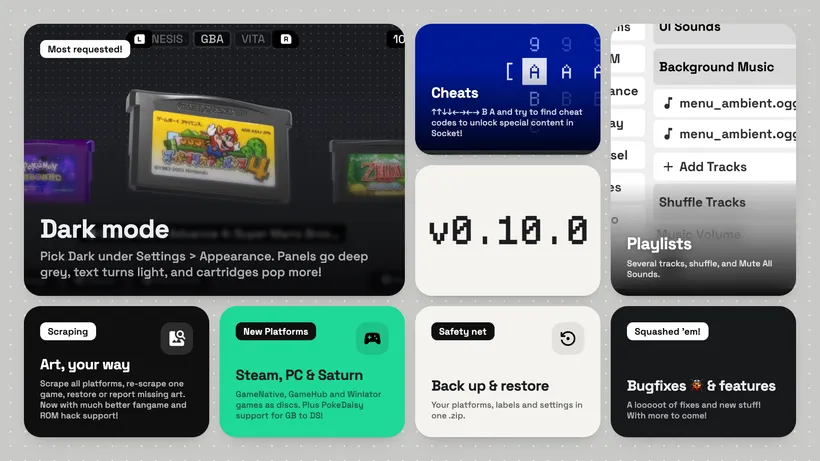
- Dark Mode: switch on "Dark Mode" under Settings > Appearance, right below Theme. Every theme now has a dark version: panels and the background turn dark, and text turns light, so cartridges stand out.
- "Rescan & Scrape All Platforms" under Settings > Platforms: rescans every ROM folder and fetches missing art in one go.
- A game's Edit panel now has "Re-scrape" (fetch its art and details again), "Restore Original" (drop all art customisations and download the default label again) and "Report Missing Art" (send the platform, file name and ROM hash so the art can be added).
- When scraping finishes, Socket says how many games still have no art.
- Background music playlists: switch on "Background Music" under Settings > Audio and the track list opens right below it. Add several tracks at once and remove any with its delete button. They play one after another, shuffled unless "Shuffle Tracks" is off.
- "Mute All Sounds" under Settings > Audio silences the music and UI sounds at once.
- "Keep Screen On" toggle under Settings > Display.
- Native Android games (ports, recomps, PC launchers) can sit in a console's shelf: long-press an app in the app drawer and pick "Add to a Console Shelf". The app gets cartridge art scraped by its name and opens like any game.
- RomM collections: the RomM library now lists your collections and smart collections next to platforms. Download a whole collection at once or pick single games; each one lands in its own platform's ROM folder.
- RomM game lists let you download a single game, not only all of them.
- "Back Up Setup" and "Restore Setup" under Settings > Platforms: save your platforms, games, labels and settings to a .zip and bring them back later or on another device. Login keys are not included.
- A loading screen on launch, instead of a frozen splash while the library loads. It follows your theme and Dark Mode.
- Some say an old code still works. Some say it opens a door. What lies behind it is for you to find. Maybe the first code is in the intro of the page?
Platforms
- Steam (GameNative, GameHub, BannerHub): PC games sit on a shelf and launch like any game.
- Windows (Winlator).
- Sega Saturn.
- PokeDaisy is now an emulator choice for Game Boy, Game Boy Color, GBA and DS. Pick it for the platform, or for single games in their Edit panel.
Changed
- App names in the app drawer follow the theme, so they are light in Dark Mode.
- Holding up or down on a controller now keeps scrolling through lists, options and settings, like on a keyboard.
- Icon-only buttons in Settings show their name in a bubble when hovered, selected with a controller or long-pressed. A long press only shows the name, it doesn't press the button.
- RomM pairing and library loading now show in a dialog with a spinner, and loading can be cancelled.
- Long option lists (like a big RomM library) open instantly and scroll smoothly. Left and right jump to the next or previous first letter, and names too long to fit scroll while selected.
- Foil labels are redone.
- The on-screen keyboard fills the screen with bigger keys. Up and down always go to the key right above or below, left and right wrap around each row, and holding a direction keeps moving.
Fixed
- Scraping without a connection now stops with a "Couldn't reach the scraping server" message. Before, the progress bar filled up with nothing found.
- Holding left or right on a slider no longer jumps to the tab bar once it reaches its end.
- A cartridge colour picked in Customize was ignored on some platforms.
- The selection outline could disappear with a controller after a list was rebuilt or a menu closed. It now comes back on its own.
- On dual-screen devices, a second screen that was off when Socket started is now picked up when you come back to the app.
❤️
Like what you are reading? If you do and want to support us, you can do so by becoming a member, tipping us or taking a look at our gaming accessory company GAMENOOK (10% off just for you). This allows us to continue what we do without succumbing to algorithms, clickbait and over-intrusive ads, while paying human writers instead of AI.


